


VPS Server Plans
Flexible, high-performance plans tailored to your hosting needs.
VPS 1
An affordable VPS for small projects and testing.
- 1 vCPU Core
- 2 GB RAM
- 40 GB NVMe SSD Storage
- 2 TB Bandwidth
- 1 IPv4 Address
- Full Root Access
VPS 2
Balanced resources for apps and websites.
- 2 vCPU Cores
- 4 GB RAM
- 80 GB NVMe SSD Storage
- 4 TB Bandwidth
- 1 IPv4 Address
- Full Root Access
VPS 4
More power for production apps and databases.
- 4 vCPU Cores
- 8 GB RAM
- 160 GB NVMe SSD Storage
- 8 TB Bandwidth
- 1 IPv4 Address
- Full Root Access
VPS 8
Serious power for busy apps and databases.
- 8 vCPU Cores
- 16 GB RAM
- 320 GB NVMe SSD Storage
- 16 TB Bandwidth
- 1 IPv4 Address
- Full Root Access
All plans are paid upfront. The monthly rate is the total plan price divided by the number of months in your plan.
Deploy Your Server Today
Launch your VPS server quickly with our easy setup process.
- Instant Provisioning
Get up and running instantly! Our servers are provisioned within a few minutes.
- Choose your Operating System
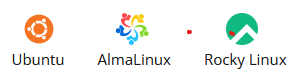
Get complete flexibility to choose the operating system that works for you. Here are operating systems available with our servers:


High-performance Storage
Extra storage volumes for your VPS
- Get a volume starting from 10 GB to 500 GB
- Add multiple volumes to a server for better space management
Simplified Billing
- Available at a flat fee. No complicated billing based on Bandwidth or IOPS usage
Manage VPS Server
Effortlessly control and monitor your VPS with advanced management tools.
- Server Management
You can Start, Stop, Restart, Rebuild your VPS from the Server Management Panel.
- Full Root Access
With full root access, you get complete control to manage your server resources.
- VNC Access
VNC allows you quick access to your VPS for easy management.
- WHMCS
Optionally, you can install & integrate WHMCS with your VPS Server seamlessly.


Secure VPS Server
DDOS Protection
Our advanced DDOS protection ensures that your VPS is protected against any attacks.
State-of-the-art Infrastructure
All VPS servers are powered by trusted infrastructure to keep them up and running.
Private Networking
Setup your own network instantly in a few clicks.

We are available 24/7 to help you with your queries
Our servers include semi-managed support related to:
- Boot, Login, Investigating Network/Hardware related issues
- Initial module installation and basic firewall setup
- Setup and re-installation of KVM VPS
- Core OS Updates & Patches
- Reverse DNS Setup
Why you can trust Hostavik
We're a new company, so instead of borrowed numbers, here's what you can count on from day one.
“Hostavik is just getting started, and every one of our first customers matters to us. Tell us what's working and what isn't.”
Every plan shows its full price before you pay, with nothing hidden at checkout.
Domains are registered in your name, and you can move them to another provider whenever you choose.
Open a support ticket or contact us from your account, and follow every reply in one place.
Manage your domains, hosting, email and invoices from a single dashboard.
Already a customer? Share your feedback

Everything for your website, in one account
- Register, renew and transfer your domains
- Manage your hosting and business email
- Pay invoices and keep track of renewals
- Open support tickets and follow every reply
Virtual Private Server (FAQs)
Have questions? We've got answers.
Our team is here to help with sales, billing and technical questions.
Contact us- What is a KVM VPS?
KVM (Kernel-based Virtual Machine) is a virtualisation technology that divides one physical server into several isolated virtual servers. Each KVM VPS has its own allocated CPU, memory and storage and runs its own operating system, separate from the others. That gives you a stable, secure environment that behaves like a server of your own, without the higher cost of a dedicated server.
- Why choose a VPS server?
A VPS gives you a server environment of your own. Each virtual server runs independently, so what other customers do on the same hardware does not affect yours. You get full root access, which means you can install any applications and configure the server exactly as you need. It is a balanced choice for anyone who wants reliable performance, isolation and the freedom to customise, without paying for a dedicated server.
- What is the Difference Between SSD and NVMe Servers?
Both are much faster than traditional hard disks. SSD (solid state drive) servers offer quick disk read and write speeds that suit websites and applications with high performance demands. NVMe (Non-Volatile Memory Express) is a newer technology that gives even higher read and write speeds than standard SSDs, which makes it the better choice for the most demanding workloads, such as busy databases and high-traffic applications.
- What Hosting Panels are Supported?
When you order an SSD or NVMe VPS, you have the option to add a cPanel or Plesk licence. A control panel lets you manage websites, email and databases through a web interface instead of the command line. These options are available only on plans that meet the minimum system requirements of the panel, so that it runs properly and securely on your server.
- Is a Dedicated IP Available?
Yes. Additional dedicated IP addresses are available for an extra fee. They are useful if you need separate IP addresses for different websites or services on your server. To add one, contact our support team.
- What is Your Backup Policy?
You are responsible for your own backups and for the content on your server. We advise taking regular backups and keeping a copy somewhere other than the server itself. You can use the backup tools in your control panel, such as cPanel, or set up a remote backup solution. That way you can recover your data if something goes wrong.
- Can I Increase or Decrease Resources on My VPS Server?
You can increase your resources by upgrading to a higher plan within the same category. At this time it is not possible to decrease resources or downgrade to a smaller plan. If you are unsure how much you need, it is sensible to start with a plan that fits your current usage and upgrade when you need more.
- Can I Upgrade from SSD-based to NVMe-based Plan or Vice-Versa?
Not at the moment. We currently support upgrades within the same storage type only. That means you can upgrade from one SSD plan to a higher SSD plan, or from one NVMe plan to a higher NVMe plan. Moving between SSD and NVMe plans is not supported, so it is worth choosing the storage type that suits your workload when you order.